Video
How it works
PageFilter


WELCOME TO FAIRPLAY OF THE MOBILE INDUSTRY
FORGET ROAMING.
FORGET UNFAIR PRICE PLANS.
FORGET BILL SHOCKS.
JOIN THE UNLIMITED GLOBAL PREMIUM WIRELESS DATA TEAM
12 MONTHS FOR ONLY
20
EUR/month
FAIRPLAY IS GLOBAL UNLIMITED FAIRPLAY COVERS
85 DESTINATIONS & COUNTRIES:
JOIN THE MOST ADVANCED 5G HIGH-SPEED PREMIUM NETWORK. JOIN 85 COUNTRIES AND TRAVEL HOT-SPOTS.

Global coverage on all our prepay travel passes and our postpay unlimited plans.


THERE ARE NO STUPID QUESTIONS, JUST FREQUENTLY ASKED ONES
General questions
My data's turned on, but it's not working?
We are sorry that you are experiencing this issue! Several things could cause it, but the following steps should help you fix it.
The first step is to turn your phone off and back on. Most of the time, that already fixes the issue.
If that did not resolve the issue, ensure that your Airplane mode is disabled and hasn't accidentally been switched on, as that can happen easily during travels.
If the issue persists, try turning off your Wi-Fi. Most of the time, your phone will want to stick to Wi-Fi, and disabling that will force it to connect to cellular data.
Then, check if there is an operating system update available.
Lastly, try and reset your network settings:
On iOS:
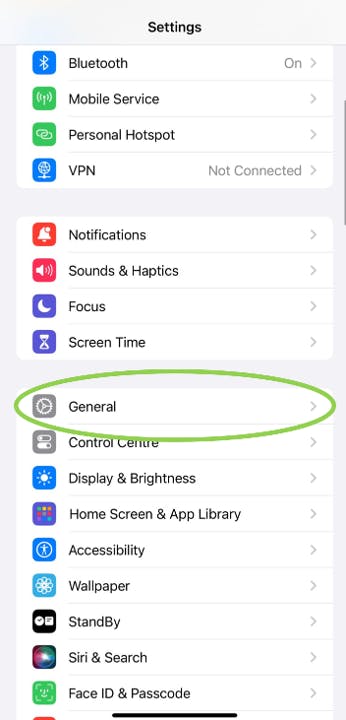
1. Go to your device settings and tap on "General".
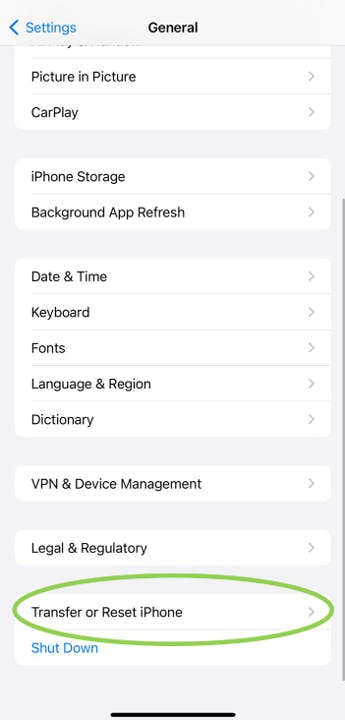
2. Scroll down to "Transfer" or "Reset iPhone".
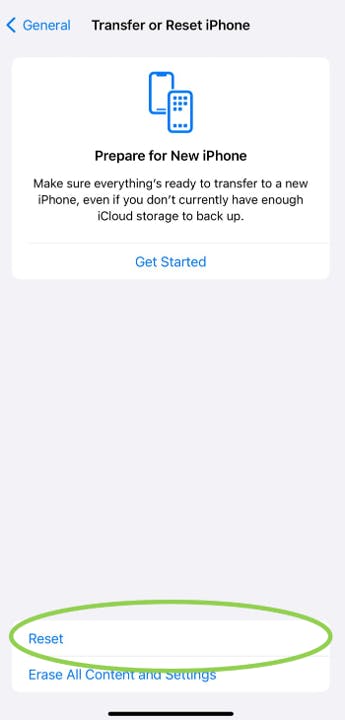
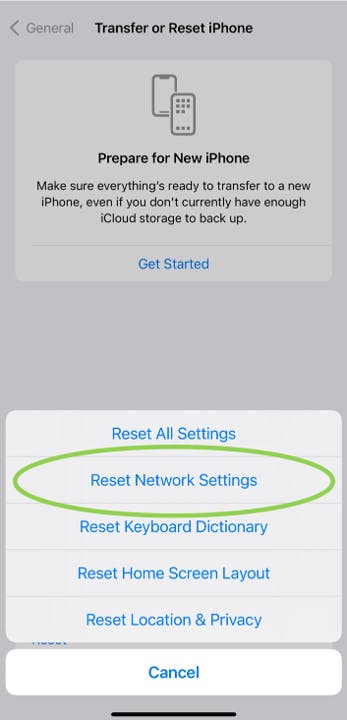
3. There, tap "Reset" and select "Reset network".
On Android:
1. Go to your device settings and tap on System.
2. Select "Advanced" and then "Reset options".
3. Tap on "Reset network settings".
If none of these steps have resolved your issues, please email us at support@fairplay-mobile.com or use "Chat" to contact our Customer Support.
How do I create a FairPlay account?
We're delighted that you are visiting our website - You're halfway to roaming freedom!
Creating a FairPlay account is simple and straightforward. However, the process differs slightly between the Desktop and Mobile app.
● Let’s start with the Desktop
Start by visiting our eShop by pressing the "Shop" button. Browse through the available products and choose the one that fits you best.
Next, we'll ask you to fill out some necessary personal information and add your credentials. Once you’ve completed this step, the system will send an activation link to the email address you provided. Your account will be created the moment you click on the activation link.
Don't worry, the system will remember your product selection and guide you through the payment process, ensuring that your first FairPlay product purchase happens immediately.
● With mobile App it’s even easier
Download our mobile app for iOS or for Android.
When app is installed on your phole, please follow the instruction below
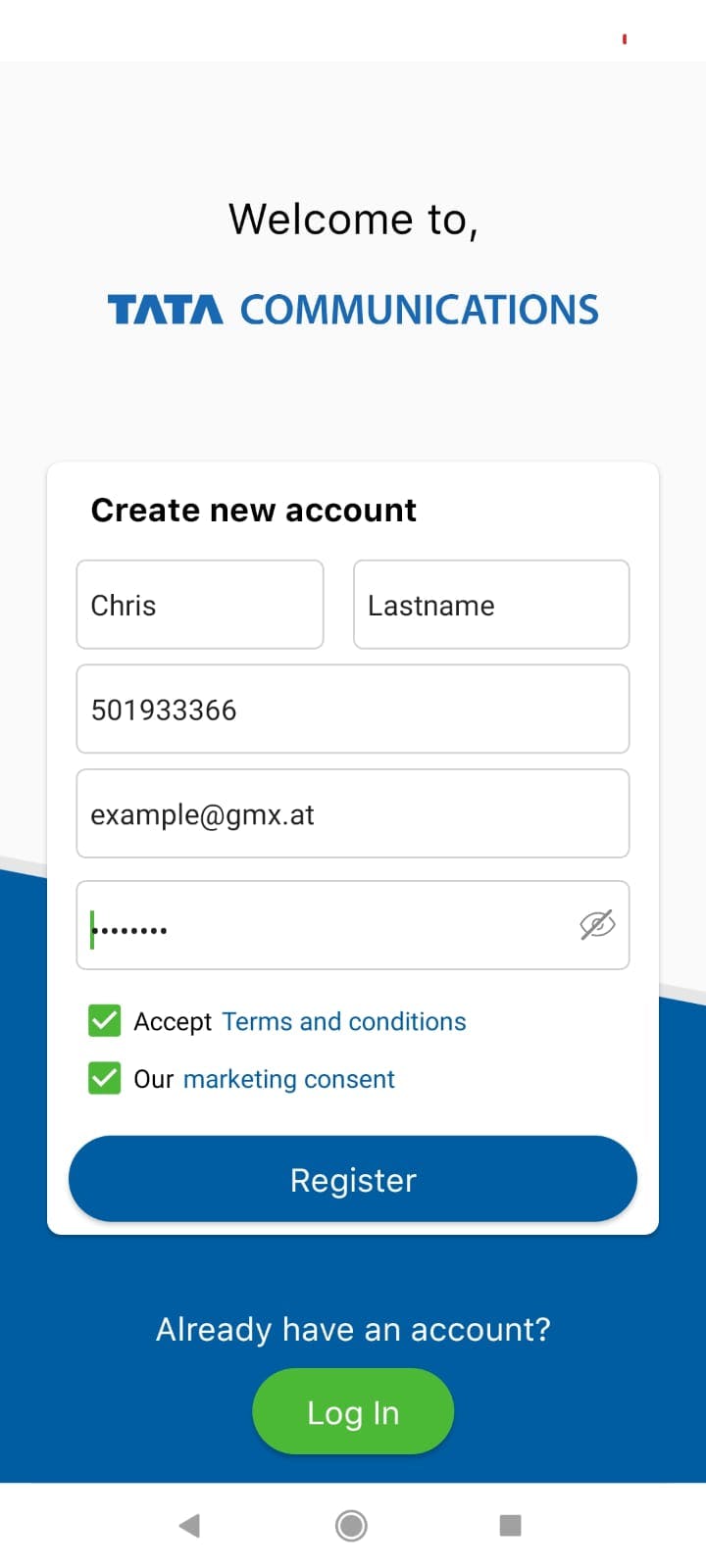
1. Press “Sign In” and provide your personal details
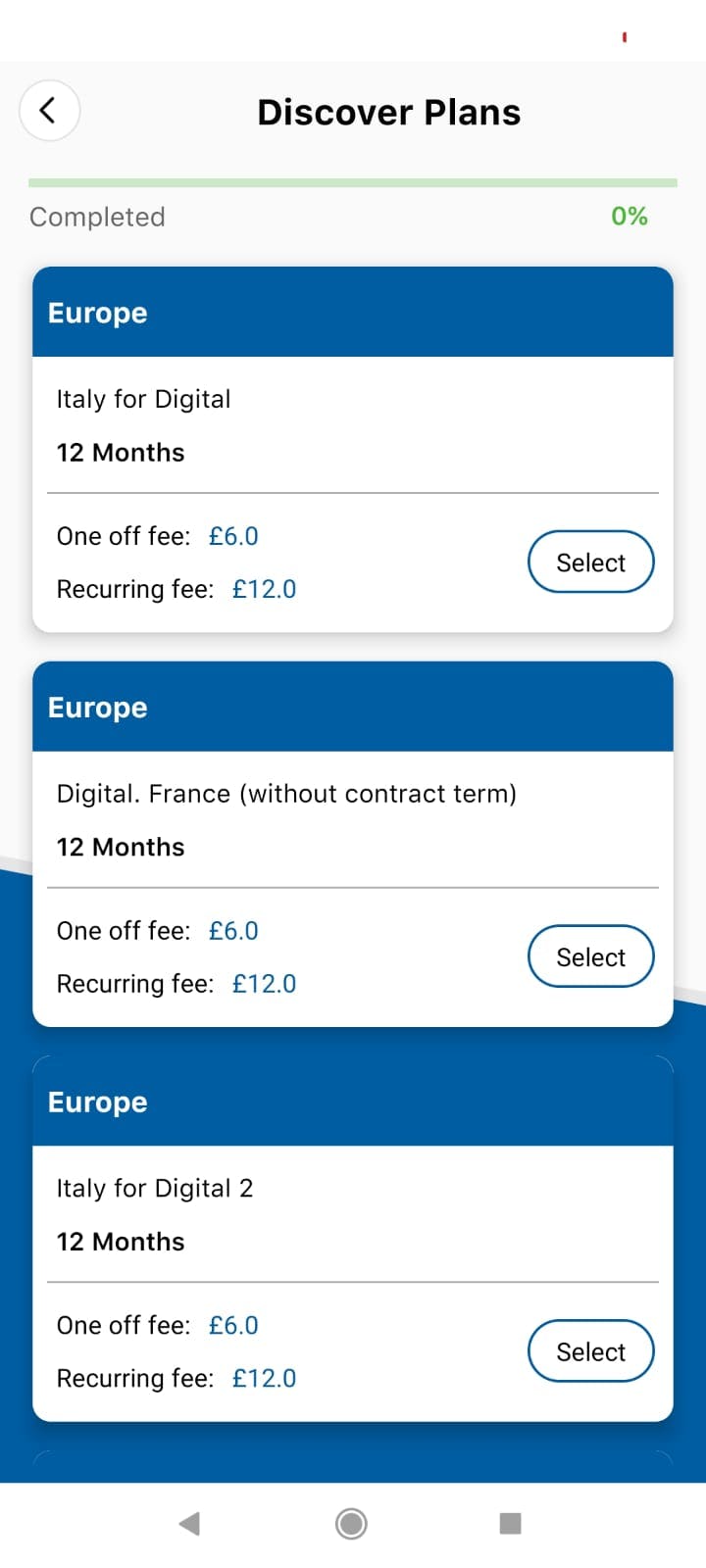
2. Choose the products, which fit to your needs
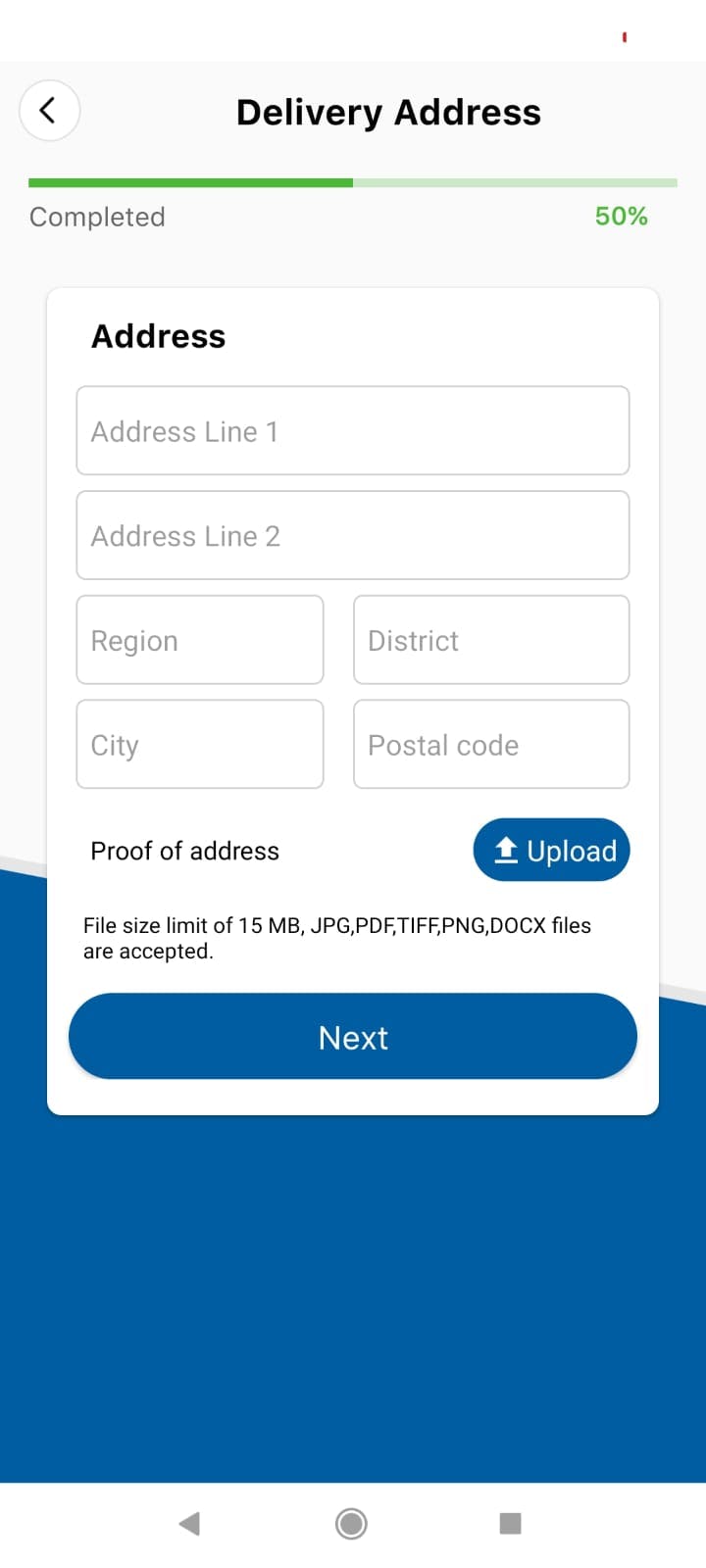
3. Fill out address details
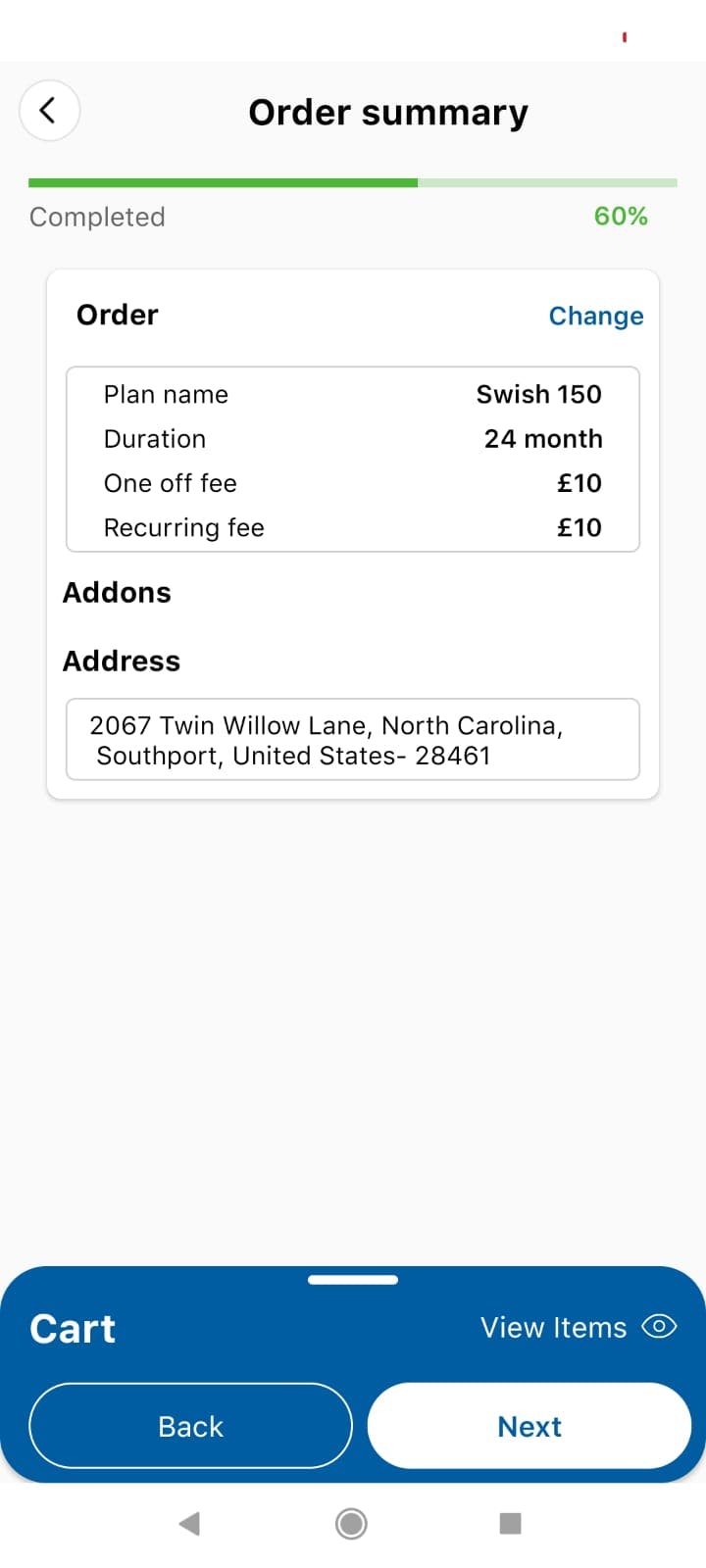
4. Check your order ones again and proceed with the payment
Just do it now and start enjoying the benefits of FairPlay!
Can I get a plan if I am from US?
Sorry, not at the moment. However, you definitely will in the future. We are currently working hard to bring our network to US.
eSIM Installation & Activation
Do I need Wi-Fi to set up my eSIM?
Not necessarily! To activate your eSIM, you need a strong internet connection, either through Wi-Fi-network or cellular data, as you need to download your FairPlay eSIM onto your device. However, it is important to ensure a flawless installation process, so we suggest you use a strong Wi-Fi-network connection to avoid any issues.
Should I install my eSIM before my trip?
You will need an internet connection, which can be either Wi-Fi or cellular data, to install your eSIM as it needs to be downloaded onto your device. However, the preferable way is to use a strong Wi-Fi connection to ensure the download and installation process completes without interference.
SO EASY IT WORKS

1. Check your
destination
test

2. Bring your
current phone
and number

3. Pick an offer

4. Place your order
& activate your
freedom
THE SECRET OF PLAYING FAIR
WHAT MAKES FAIRPLAY MOBILE THE ONLY FAIR WIRELESS CHOICE

Hey, it‘s unlimited and you only pay what
you use. That‘s what we call Fairplay.
- You start with 5 GB each month.
- If you use more,
you automatically switch to the higher GB step (incl.
cost cap). - Your monthly bill always adapts to the GB you
use.

Global 5G High speed data for free
You get premium wireless data on the world‘s
largest high quality 5G network to over 85
countries, but for way less than what big wireless
companies charge.

Your smartest communication solution
Use your local best price SIM with FairPlay global
data eSIM and save of up to 40%.

BYNP (bring your number & phone)
FairPlay runs on your eSIM capable device and by your current local phone number.
CHECK YOUR PHONE:
CHECK TO SEE IF YOUR PHONE IS eSIM READY
Check if our services are available in your area!
We are extending our services to all areas in the country, select your area to see if we can provide services to you!
Addon 1
Addon3
Addon2
(1-12 month)
(for rest of period)
Addon1
Addon 2
Addon7
(1-6 month)
(for rest of period)
Addon6
Addon5
Addon4
FairPlay means worryfree travel without costly roaming boarders.
Join the team.
powered by